Changelog
What changed in each release of GoDNA. The Godot addon and the Unreal exporter share version numbers.
0.10.0 (beta), The Character Update, 2026-11-20
GoDNA now imports more than MetaHumans: Character Creator 4 and 5 characters straight from their FBX, Fab and other Unreal characters through the exporter, and Mixamo or custom skeletons. See the new Characters section.
- Reimport your characters after updating. Character Creator characters refresh GoDNA's material settings on that reimport by themselves, keeping what you baked in the studios.
Editions
- The editions are now GoDNA Lite, GoDNA Standard and GoDNA Pro (before: GoDNA Lite, GoDNA and GoDNA Studio
Pro). The zips are
GoDNA-Lite,GoDNA-StandardandGoDNA-Pro, and the editor tab is named after your edition. Nothing changes in your projects or characters. See Editions. - GoDNA Standard and GoDNA Lite have the GoDNA tab (enable the GoDNA plugin): import characters from the Characters drawer and look at them with the studio lights, graphics and camera settings.
- GoDNA Standard: Materials tab with the main settings of every shader (skin, eyes, teeth, hair cards, eyelashes and clothing), baked into the character like Pro's studios.
- GoDNA Standard: Animations tab: pack body clips and face takes into a character, from
GoDNA/animationsor any FBX, glTF or animation file (FBX and glTF clips are set up for retargeting for you), set each one's name, loop and autoplay, and choose whether the character's own animation is imported. - GoDNA Lite's hair gets a light version of the hair shader: soft edges, highlights along the strands, per-strand color and self-shadowing, in place of flat cut-out cards.
Character Creator (CC4 / CC5)
- Import a Character Creator FBX straight from the Characters drawer (Import Character...): its
.jsonandtexturesfolder come along, and the materials are set up on import. No Unreal step. - Skeletons are recognised: eye, jaw, twist and toe bones keep their parts (
LeftEye,Jaw,LeftUpperArmTwist01…), and helper and face bones fold into the body as on MetaHumans. - Face shapes: CC4 (Extended) and CC5 (HD) faces get all 52 ARKit shapes from their own expressions, with the jaw, teeth and tongue moving as in Character Creator. Face capture, Face Studio and the eye look-at work on them as on MetaHumans. Other characters whose morph targets have ARKit's names get those shapes too.
- Materials from the
.json: base colour, normal, roughness / metallic / AO, opacity and glow maps on GoDNA's skin, eye, hair and cloth shaders, picked from Character Creator's own shader names. Colour tints, skin colour and roughness, and the eyes (sclera, iris size, darker corners) follow Character Creator's settings. Textures stored upside down are flipped. - Eye occlusion and tear lines render: the soft shadow around the eyes and the wet line along the lids.
- Hair, brows, lashes and beards take Character Creator's root and tip colours and both dyes, are shaded as one smooth volume like MetaHuman hair, and are listed in Groom Studio; clothes are in Outfit Studio with the cloth shader, cut-outs and glow kept.
- Animation from iClone: a motion exported in the character's FBX plays on its AnimationPlayer, body and face, and shows up in Body Studio, Face Studio, the Animation Combiner and Character Animations (In its file, with Import it to leave it out). The Import Report lists it.
- Props rigged to bones of their own (a helmet, a weapon) import hidden, with a note in the Import Report.
- Setting a character up again, or reimporting it after a GoDNA update, refreshes GoDNA's material picks while keeping what you baked in the studios.
Other characters
- The Unreal exporter checks each character and rates it fully, partially or not compatible, listing what is left out and how to fix what blocks it. Check Compatibility of Selected Character runs the check alone.
- Characters other than MetaHumans export, such as Fab characters on the Unreal humanoid skeleton, with a fixed expression when they have no face rig. Modular characters (several meshes) work too.
- Characters without a Blueprint: select a character's skeletal meshes in the Content Browser (for example one imported from GLB or FBX) and choose Export Selected Character.
- Mixamo skeletons import, and other bone names come in under their own names: Map Bones in the Import
Report picks which bone is which (with Guess), saved in the
.gdna, so animations retarget. - Materials GoDNA has no shader for import with their textures as Godot standard materials (base colour, normal, roughness, metallic, AO, emissive, opacity), including glTF materials. In Skin, Outfit and Groom Studio such a surface can switch to GoDNA's skin, eye, cloth or hair shader (Shader dropdown); a badge on the character's tile lists the surfaces that look compatible.
- Eyes using Unreal's Eye shading model import with GoDNA's eye shader and their own iris and sclera; eyes on low-resolution eyeballs keep a round pupil of the right size.
- Normal maps made the other way round (OpenGL, from Unity or Blender) are recognised and no longer show bumps as dents.
- Feet no longer turn inward while animating, and characters without eye bones get a preview in the Characters drawer.
Studio
- Character Animations (Animation Studio dropdown): lists the character's packed animations and adds more from
anywhere in the project; rename, loop, keep in place, autoplay, preview, Bake into the
.gdna. Add Folder... lists a whole pack as a checklist (straight from disk for a pack outside the project, copying only the checked files, set up as retargeted animations), with Shorten names and bulk loop / in place / remove. - In place for clips that walk or run, including root-motion clips that curve, pivot, start or stop. Body Studio previews them that way.
- Retarget From: Detect picks Mixamo or UE5 Mannequin / MetaHuman from a clip's bone names.
- FileSystem dock: right-click animation files or a folder for GoDNA: Set Up as Animations and GoDNA: Add to Character Animations.
- Body Studio and Character Animations play clips on a timeline (feet, hips height and speed graphs, scrubbing). Previews start each clip on the center, and switching clips keeps the camera.
- The Animation Combiner picks its body clip and face take with a file dialog from anywhere in the project.
- Import Report in the Characters drawer: bones kept and removed, humanoid bones for retargeting, bones per vertex, face shapes, warnings and what to fix. Reimport a character to fill it in.
- Camera drawer: Display modes (Lit, Unshaded, Wireframe, Lighting Only, Normals, UV Checker, Bone Weights), a Skeleton overlay with joint names, Clay, and a Pose check (rest or export pose drawn over the other, turned limbs listed). They only change the view.
Fixes
- Emissive textures no longer turn the whole surface white: the emissive colour scales the texture, as in Unreal.
- Materials whose opacity is a texture of its own are no longer imported opaque.
- Map Bones lists bones as a tree, in body order, and fits on the screen.
Wiki and license
- A Characters section with a page each for MetaHumans, Character Creator and everything else, with characters you can drag to turn around; new renders and videos of four characters, and new screenshots of every edition.
- Licensing of your characters is spelled out in the license agreement (section 5) and on License and trademarks: GoDNA is import technology, owns no rights in the characters you import, and each one stays under its own license (Epic's for MetaHumans, Reallusion's for Character Creator characters, the seller's for any other).
0.9.1 (beta), 2026-10-29
- New free edition, GoDNA Lite: the importer, retargeting and runtime, with Godot's standard materials instead of GoDNA's shaders. See Editions.
- Three editions instead of four: GoDNA Studio is now part of GoDNA Studio Pro. GoDNA Lite, GoDNA and GoDNA Studio Pro remain; the GoDNA tab, face shapes and every studio are in Studio Pro.
- The GoDNA Human Exporter is on Fab: GoDNA Human Exporter. See Installation.
- Groom Studio: Live preview (on by default) shows a groom's new Smoothing or Cards LOD a few seconds after you change it, before you Bake. A note under the two settings says what the view shows.
- Groom Studio: Cards LOD sits under Smoothing.
- The Unreal exporter exports each groom's most detailed cards, LOD 0, by default. High quality MetaHumans used to get LOD 1, because their groom's card list leaves LOD 0 out. Export characters again to get the LOD 0 cards.
- The Unreal exporter's description names the two Unreal plugins it enables: Python Editor Script Plugin and Editor Scripting Utilities.
- Wiki: click a screenshot or render to see it large, zoom in, and step through the page's images.
0.9.0 (beta), The Hair Update, 2026-10-28
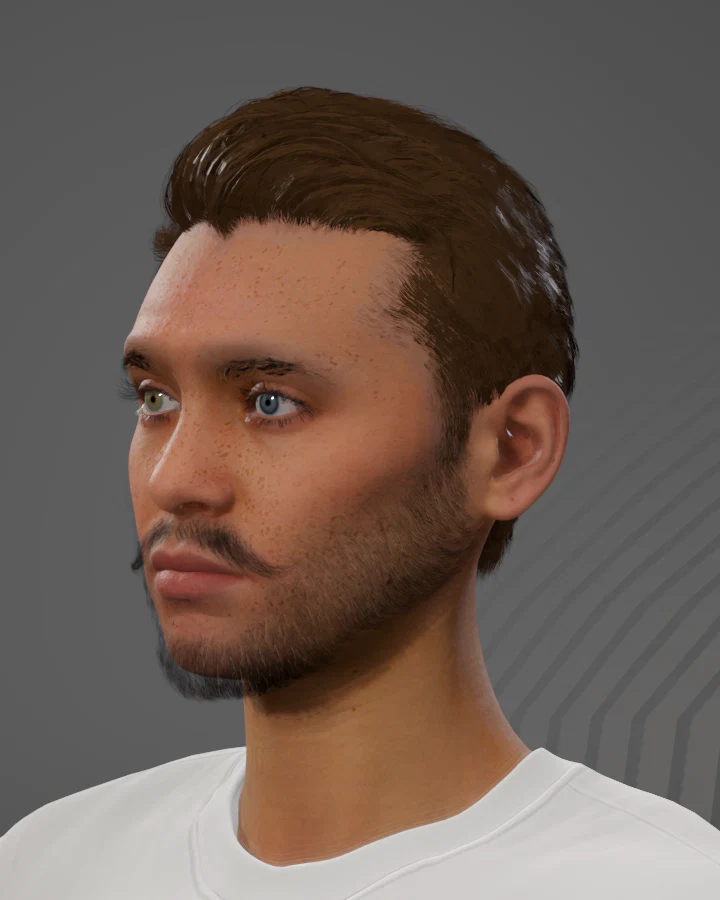
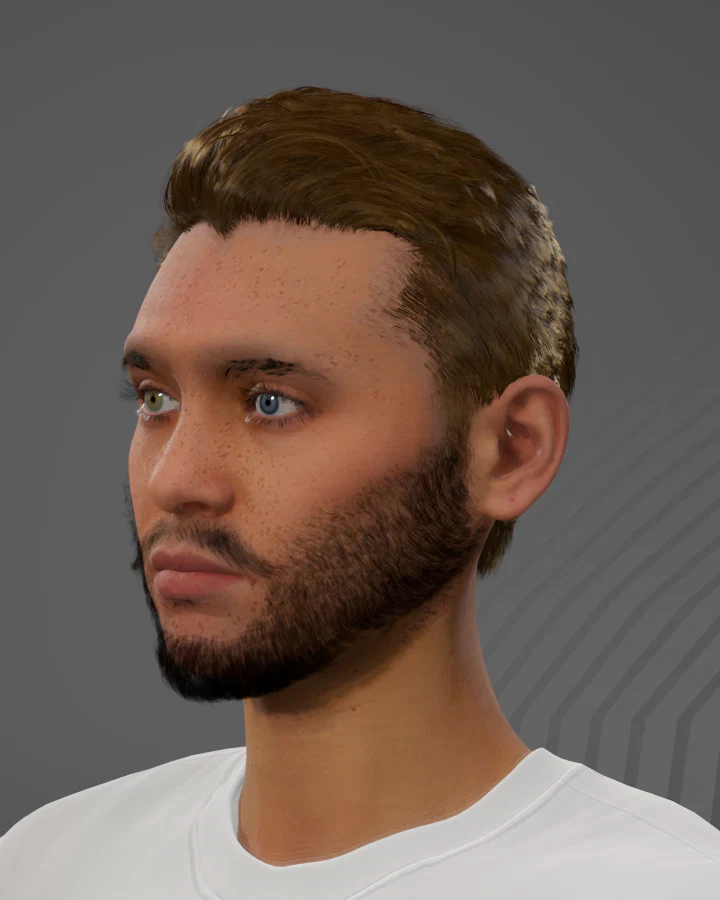
Steve in 0.8.1 (left) and 0.9.0 (right).
- Reimport your characters after updating: the new hair shading needs data that is worked out on import.
- Hair shadows itself: inner layers, the hair under a parting and a beard under a mustache are darker, as in Unreal.
- Hair color varies per strand and per card, and roughness per strand, from the character's Unreal settings.
- Beards and other facial hair are lit like Unreal's facial hair material: dark, dense and without shine. Grey strands no longer show in beards and brows at low grey amounts.
- Dark hair (brows, mustaches) keeps its color instead of turning olive-grey.
- Hair is shaded with Unreal's hair model.
- Hair highlights follow the strands smoothly instead of breaking into blocks under hard lights, and use the groom's strand direction maps from Unreal when it has them.
- Characters drawer: a reimport button on each character's tile.
- Groom, Outfit and Skin Studio: hover a setting's name for a short description of what it does.
- Groom, Outfit and Skin Studio: undo and redo (Ctrl+Z, Ctrl+Shift+Z / Ctrl+Y), a Compare button (or hold C) to see the baked look, and saved looks that can be loaded onto another group or character.
- Groom Studio: Match hair color on brows, mustache, beard and eyelashes follows the head hair's color.
- Groom Studio: Cards LOD switches a groom between Unreal's card LODs. The Unreal exporter now exports every card LOD, so export characters again to use it.
- Groom Studio: Scale and Position for each groom, and sliders for the new color, roughness, self shadow and root fade settings.
- Groom cards are smoothed along their length (Smoothing, default 2) and the hair is shaded as one smooth volume.
- Eyelashes are their own mesh, so the head can use LODs.
- New Neutral stage, close to the MetaHuman editor's look, is the default stage.
- Graphics drawer in the GoDNA tab: quality preset, resolution, upscaler, anti-aliasing, shadows, subsurface and Mesh LOD.
- The Unreal exporter is also packaged as Fab Code Plugin zips, one per engine version.
0.8.1 (beta), 2026-10-27
- The Godot addon and the Unreal exporter are released together, with matching version numbers.
- The Output panel warning for fabric features Godot can't show yet no longer points to a file that isn't shipped.
0.8.0 (beta), 2026-10-27
- Initial beta release.